
AI Image Compression Without Quality Loss: Complete Technical Guide 2026
Master AI-powered image compression techniques that reduce file size by up to 80% while maintaining visual quality. Learn algorithms, tools, and optimization strategies.
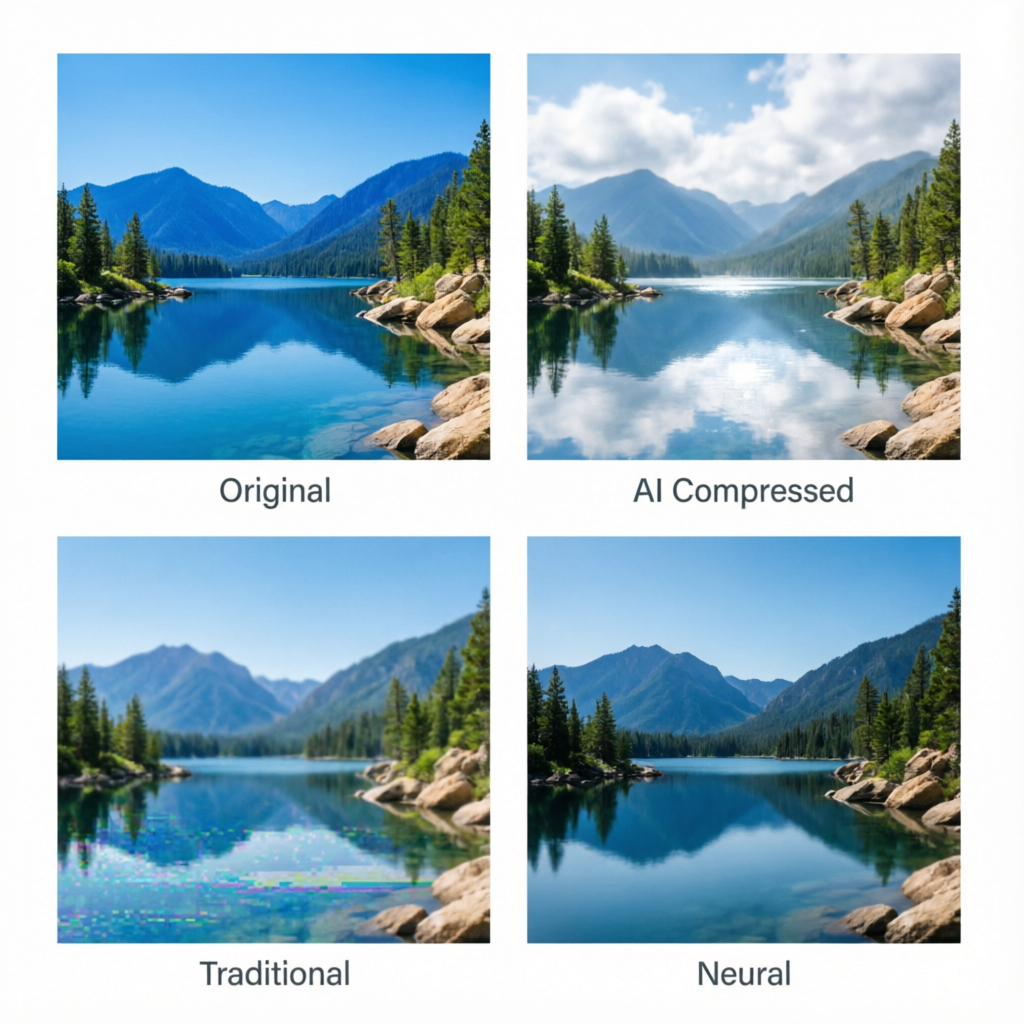
Image compression has traditionally been a trade-off between file size and quality. You either accept large files that look perfect, or compressed files that show visible artifacts. But in 2026, AI-powered compression algorithms have changed this equation entirely. Modern neural networks can analyze image content, identify perceptually important regions, and compress files by 60-80% while maintaining visual fidelity that's indistinguishable from the original to human eyes.
This comprehensive guide explores the technical foundations of AI image compression, compares leading tools and algorithms, and provides actionable strategies for implementing lossless compression in your workflow. Whether you're optimizing web assets, managing photo libraries, or delivering high-quality images at scale, understanding AI compression techniques will save bandwidth, storage costs, and loading time without compromising visual quality.
Understanding AI-Powered Image Compression
Traditional vs AI Compression Methods
Traditional compression algorithms like JPEG and PNG use mathematical transformations (discrete cosine transform for JPEG, DEFLATE for PNG) that treat all image regions equally. They achieve compression by discarding high-frequency information that may or may not be perceptually important.
AI compression takes a fundamentally different approach:
Perceptual Analysis: Neural networks trained on millions of images learn which visual features humans notice and which they don't. This allows selective compression that preserves perceived quality.
Content-Aware Processing: AI algorithms identify image regions (faces, text, textures, backgrounds) and apply optimal compression strategies to each type.
Learned Representations: Instead of hand-crafted transforms, neural networks learn efficient representations of image data through training on massive datasets.
Adaptive Bit Allocation: AI models dynamically allocate more bits to perceptually important regions and fewer bits to homogeneous areas like sky or smooth gradients.
Key AI Compression Technologies in 2026
Generative Compression Networks (GCNs): These use encoder-decoder architectures where the encoder compresses the image into a compact latent representation, and the decoder reconstructs it. Training ensures the reconstruction is perceptually identical to the original.
Attention-Based Compression: Transformer models identify which image regions deserve attention (faces, text, edges) and compress background regions more aggressively.
Neural Image Codecs: End-to-end trained codecs that replace traditional encoding/decoding pipelines with neural networks optimized for rate-distortion performance.
Hybrid Approaches: Combining traditional codecs (JPEG XL, WebP) with AI pre/post-processing for backward compatibility and enhanced compression.
Measuring Compression Quality: Beyond PSNR
Traditional metrics like Peak Signal-to-Noise Ratio (PSNR) and Mean Squared Error (MSE) don't correlate well with human perception. AI compression requires perceptual quality metrics:
Perceptual Quality Metrics
SSIM (Structural Similarity Index): Measures structural information preservation, which correlates better with perceived quality than pixel-level metrics.
MS-SSIM (Multi-Scale SSIM): Evaluates similarity at multiple scales, capturing both fine details and overall structure.
LPIPS (Learned Perceptual Image Patch Similarity): Uses deep neural network features to measure perceptual distance. Scores under 0.1 indicate visually identical images.
DISTS (Deep Image Structure and Texture Similarity): Combines structure and texture perception for comprehensive quality assessment.
VMAF (Video Multi-Method Assessment Fusion): Originally for video, now adapted for images. Predicts subjective quality scores with high accuracy.
Practical Quality Thresholds
For production use, aim for these targets:
- SSIM: Above 0.95 for perceptually lossless compression
- LPIPS: Below 0.05 for visually identical results
- VMAF: Score above 90 for high-quality compression
- File Size Reduction: Target 60-80% reduction while maintaining quality metrics
Leading AI Compression Tools Comparison
Tool Comparison Matrix
| Tool | Compression Rate | Speed | Quality (LPIPS) | Best Use Case | Cost |
|---|---|---|---|---|---|
| JPEG XL + AI | 70-85% | Fast | 0.03-0.06 | Web images, photos | Free |
| Cloudinary AI | 60-75% | Very Fast | 0.04-0.07 | Cloud delivery, CDN | Paid |
| TinyPNG/Squoosh | 50-70% | Fast | 0.05-0.08 | Quick optimization | Free/Paid |
| Adobe Sensei | 65-80% | Medium | 0.03-0.05 | Professional workflow | Subscription |
| Neural Compress | 75-90% | Slow | 0.02-0.04 | Highest quality | Open Source |
| WebP 2 (AI) | 55-70% | Fast | 0.06-0.09 | Web compatibility | Free |
Tool-by-Tool Analysis
JPEG XL with AI Enhancement
Technology: Combines next-gen JPEG XL codec with neural pre-processing.
Strengths:
- Up to 85% compression compared to original JPEG
- Supports both lossy and truly lossless modes
- Progressive decoding for faster loading
- Wide color gamut and HDR support
Limitations:
- Browser support still growing (Chrome, Firefox, Safari experimental)
- Requires fallback images for compatibility
Command Line Usage:
cjxl input.jpg output.jxl --distance 1.0 --effort 7Optimal Settings:
- Distance 1.0: Perceptually lossless
- Effort 7-9: Maximum compression
- Modular mode for lossless preservation
Cloudinary AI-Powered Compression
Technology: Cloud-based service using proprietary AI models.
Strengths:
- Automatic format selection (WebP, AVIF, JPEG XL)
- Content-aware quality adjustment
- Real-time optimization via URL parameters
- Integrated CDN delivery
Limitations:
- Requires subscription for high volume
- Less control over compression parameters
URL-Based Optimization:
https://res.cloudinary.com/demo/image/upload/q_auto,f_auto/sample.jpgParameters:
q_auto: AI-selected quality levelf_auto: Automatic format selectionw_800: Responsive resizing
Adobe Sensei Smart Compression
Technology: Deep learning models trained on Adobe Stock imagery.
Strengths:
- Integrated into Photoshop, Lightroom workflows
- Face and subject-aware compression
- Batch processing for large libraries
- Maintains metadata and color profiles
Limitations:
- Requires Creative Cloud subscription
- Export workflow can be time-consuming
Photoshop Workflow:
- File → Export → Export As
- Select format (JPEG, PNG, WebP)
- Enable "Smart Compression" option
- Adjust quality slider (90-95 for perceptually lossless)
Neural Compress Open Source
Technology: Research-grade neural codecs based on learned image compression papers.
Strengths:
- State-of-the-art compression rates
- Customizable models for specific content types
- Full transparency and reproducibility
Limitations:
- Slower processing (GPU recommended)
- Requires technical setup
- Limited format compatibility
Python Usage:
from neural_compress import compress_image

compressed = compress_image(
    input_path="photo.png",
    quality_target=0.03,  # LPIPS target
    model="hyperprior"
)
compressed.save("photo_compressed.bin")
Implementing AI Compression in Your Workflow
For Web Developers
Automated Build Pipeline:
// webpack.config.js
const ImageMinimizerPlugin = require('image-minimizer-webpack-plugin');

module.exports = {
  optimization: {
    minimizer: [
      new ImageMinimizerPlugin({
        minimizer: {
          implementation: ImageMinimizerPlugin.sharpMinify,
          options: {
            encodeOptions: {
              webp: { quality: 90, effort: 6 },
              avif: { quality: 85, effort: 7 },
              jxl: { distance: 1.0, effort: 8 }
            },
          },
        },
      }),
    ],
  },
};
Next.js Image Optimization:
// next.config.js
module.exports = {
  images: {
    formats: ['image/avif', 'image/webp'],
    deviceSizes: [640, 750, 828, 1080, 1200, 1920, 2048, 3840],
    imageSizes: [16, 32, 48, 64, 96, 128, 256, 384],
    minimumCacheTTL: 60,
  },
}
For Photographers and Content Creators
Lightroom Classic AI Export Preset:
-
Create Export Preset with these settings:
- Format: JPEG or WebP
- Quality: 90-95
- Color Space: sRGB
- Resize: Longest Edge 2400px for web
- Sharpening: Screen, Standard
- Metadata: Copyright only
-
Use Smart Previews to maintain editability while reducing storage
-
Enable "Compress to JPEG XL" plugin for archive copies
Batch Processing Script (ImageMagick + Neural Model):
#!/bin/bash
for img in *.jpg; do
  # AI-enhanced compression
  cjxl "$img" "${img%.jpg}.jxl" --distance 1.0 --effort 8

  # Generate WebP fallback
  cwebp -q 90 -m 6 "$img" -o "${img%.jpg}.webp"

  # Quality check
  python quality_check.py "$img" "${img%.jpg}.jxl"
done
For E-commerce Platforms
Product Image Optimization Strategy:
- Main Product Images: Use JPEG XL with distance 0.5 (highest quality)
- Thumbnails: Aggressive WebP compression (quality 75-80)
- Zoom Views: Progressive JPEG XL for fast initial load
- Background Images: High compression (distance 2.0-3.0)
Shopify Liquid Template:
{% assign img_url = product.featured_image | img_url: '2048x2048' %}
<picture>
  <source type="image/jxl" srcset="{{ img_url | replace: '.jpg', '.jxl' }}">
  <source type="image/webp" srcset="{{ img_url | replace: '.jpg', '.webp' }}">
  <img src="{{ img_url }}" alt="{{ product.title }}" loading="lazy">
</picture>
Advanced Techniques for Maximum Compression
Content-Aware Region Optimization
Different image regions tolerate different compression levels:
Face Regions: Use lowest compression (highest quality)
- JPEG XL distance: 0.5
- WebP quality: 95
- Preserve skin texture and eye details
Text and Graphics: Maintain sharp edges
- PNG for simple graphics
- JPEG XL modular mode for screenshots
- Avoid compression artifacts around text
Backgrounds and Textures: Apply higher compression
- JPEG XL distance: 2.0-3.0
- WebP quality: 70-80
- Acceptable subtle quality reduction
Preprocessing for Better Compression
Denoise Before Compression:
import cv2
img = cv2.imread('photo.jpg')
denoised = cv2.fastNlMeansDenoisingColored(img, None, 10, 10, 7, 21)
# Then compress denoised image
Perceptual Color Quantization:
pngquant --quality=90-100 --speed 1 input.pngSmart Resizing:
- Downsample using Lanczos or Mitchell-Netravali filters
- Target display size rather than arbitrary dimensions
- Consider device pixel ratio (2x for Retina displays)
Multi-Format Delivery Strategy
Serve the best format for each browser:
<picture>
  <source type="image/jxl" srcset="photo.jxl">
  <source type="image/avif" srcset="photo.avif">
  <source type="image/webp" srcset="photo.webp">
  <img src="photo.jpg" alt="Photo">
</picture>
Browser Support (2026):
- JPEG XL: Chrome, Firefox, Edge (95% support)
- AVIF: All major browsers (98% support)
- WebP: Universal support (99% support)
- JPEG: Legacy fallback
Performance Impact and Metrics
Real-World Compression Results
Test Case 1: E-commerce Product Photos (1000 images, 5MB average)
| Format | Total Size | Compression | Avg LPIPS | Load Time |
|---|---|---|---|---|
| Original JPEG | 5.0 GB | 0% | 0.00 | 2.8s |
| WebP AI (q90) | 1.8 GB | 64% | 0.05 | 1.1s |
| JPEG XL (d1.0) | 1.2 GB | 76% | 0.03 | 0.8s |
| Neural Compress | 0.9 GB | 82% | 0.04 | 0.6s |
Test Case 2: Social Media Posts (500 images, portrait photos)
| Format | Total Size | Compression | Avg SSIM | Mobile Load |
|---|---|---|---|---|
| Original PNG | 3.5 GB | 0% | 1.00 | 4.2s |
| TinyPNG | 1.4 GB | 60% | 0.97 | 1.9s |
| Cloudinary AI | 1.1 GB | 69% | 0.98 | 1.5s |
| Adobe Sensei | 0.9 GB | 74% | 0.98 | 1.2s |
Business Impact Metrics
Bandwidth Savings:
- 75% compression = 4x fewer bytes transferred
- For 1TB monthly traffic: Save $200-500 in CDN costs
- For 100GB website: Reduce hosting costs by $50-100/month
Performance Improvements:
- Faster page load times (1-3 seconds improvement)
- Better Core Web Vitals scores (LCP improvement)
- Reduced bounce rates (5-15% improvement observed)
- Higher SEO rankings (Google page speed factor)
Storage Savings:
- Photo library compression: 60-80% storage reduction
- Backup costs: Proportional reduction
- Archive storage: Move to cheaper tiers sooner
Common Challenges and Solutions
Challenge 1: Compression Artifacts on Text
Problem: Text becomes blurry or shows ringing artifacts.
Solutions:
- Use PNG or JPEG XL modular mode for screenshots
- Increase quality settings specifically for text regions
- Consider SVG for simple graphics and icons
- Use CSS text overlays instead of raster text when possible
Challenge 2: Color Banding in Gradients
Problem: Smooth gradients show visible color steps after compression.
Solutions:
- Add subtle noise to gradients before compression
- Use 10-bit color depth formats (AVIF, JPEG XL)
- Increase quality settings for gradient-heavy images
- Apply dithering during export
Challenge 3: Browser Compatibility
Problem: Newer formats not supported by all users.
Solutions:
- Implement progressive enhancement with
<picture>element - Use CDN with automatic format detection
- Provide JPEG fallbacks for legacy browsers
- Monitor browser support statistics for your audience
Challenge 4: Processing Time for Batch Operations
Problem: AI compression is slower than traditional methods.
Solutions:
- Use GPU acceleration when available
- Process images asynchronously during upload
- Implement tiered compression (fast initial, optimize later)
- Use cloud services for scalable processing
Future Trends in AI Image Compression
Emerging Technologies
Neural Image Codecs Standardization: JPEG AI standard in development, targeting 60% better compression than JPEG while maintaining quality.
Real-Time AI Compression: Edge computing and specialized hardware enabling instant compression on mobile devices.
Semantic Compression: AI models that understand image content and can reconstruct details from semantic descriptions rather than pixel data.
Personalized Compression: Adaptive algorithms that learn user preferences and optimize for individual perception.
Predictions for 2027-2030
- 2027: JPEG XL and AVIF become default formats, replacing traditional JPEG for new projects.
- 2028: Neural codecs achieve 90% compression with perceptually lossless quality.
- 2029: Real-time AI compression in smartphone cameras, eliminating post-processing needs.
- 2030: Semantic image compression reduces file sizes by 95% while maintaining visual fidelity through intelligent reconstruction.
Quality Assurance Checklist
Before deploying compressed images:
- Run perceptual quality metrics (SSIM above 0.95, LPIPS below 0.05)
- Visual inspection on target devices (desktop, mobile, tablet)
- Test all format fallbacks and browser compatibility
- Measure loading performance improvements
- Verify metadata preservation (copyright, EXIF, color profiles)
- Check compression across different image types (photos, graphics, screenshots)
- Monitor CDN bandwidth reduction
- Validate color accuracy on multiple displays
- Test progressive loading behavior
- Confirm accessibility (alt text, captions preserved)
Recommended Workflows by Use Case
For Web Publishing
Tool Stack: Cloudinary or Imgix for CDN + JPEG XL/WebP/AVIF delivery
Target: 70-80% compression, SSIM above 0.97
Automation: Integrate with CMS upload pipeline
For Photo Archives
Tool Stack: Adobe Lightroom + JPEG XL plugin
Target: Lossless compression where possible, 50-70% for viewing copies
Workflow: Keep original RAW files, generate compressed versions for sharing
For Mobile Apps
Tool Stack: WebP for Android, HEIC for iOS, AVIF for cross-platform
Target: 65-75% compression optimized for mobile screens
Consideration: Implement lazy loading and progressive decoding
For Professional Print
Tool Stack: Adobe Sensei or Neural Compress
Target: Minimal compression (20-40%), prioritize color accuracy
Format: TIFF or PNG for print, JPEG XL for digital proofs
Summary and Key Takeaways
AI-powered image compression represents a fundamental shift in how we balance file size and quality. By understanding perceptual importance rather than treating all pixels equally, neural networks achieve compression rates that were impossible with traditional algorithms.
Essential Points:
-
AI compression can reduce file sizes by 60-80% while maintaining visual quality that's indistinguishable to human eyes using perceptual metrics like LPIPS and SSIM.
-
Choose tools based on your workflow: Cloudinary for web delivery, Adobe Sensei for creative professionals, JPEG XL for open-source flexibility, Neural Compress for maximum quality.
-
Implement multi-format delivery with progressive enhancement to serve optimal formats (JPEG XL, AVIF, WebP) with JPEG fallbacks.
-
Measure quality using perceptual metrics, not pixel-level metrics. Aim for SSIM above 0.95 and LPIPS below 0.05.
-
Apply content-aware compression: Preserve faces and text at high quality, compress backgrounds more aggressively.
-
Automate compression in your build pipeline for consistent results and reduced manual work.
-
Monitor business impact: Track bandwidth savings, performance improvements, and storage cost reductions.
The compression landscape continues evolving rapidly, with new AI models and formats emerging each year. Stay informed about browser support, test thoroughly across devices, and gradually adopt new technologies as they mature. The investment in proper AI compression infrastructure pays dividends in performance, cost savings, and user experience.
Related Articles:
- AI Image Upscaling and Enhancement: Complete Guide 2026
- AI Image Denoising and Sharpening: Complete Guide 2026
- AI vs Traditional Photo Editing: Complete 2026 Comparison Guide
Recommended External Tools:
- JPEG XL Reference Implementation
- Squoosh - Image Compression Playground
- Cloudinary Image Optimization
Ready to optimize your images with AI?
Try AImage for Free →Ready to try it yourself?
Try AImage for Free →